Showing posts with label Abby. Show all posts

Monday, January 20, 2014

For Our Dogster Friends

Update February 11th: Monster Speedup and Experimental Photobucket Rules

One thing that has become quickly apparent is that HTTrack can be ridiculously slow especially on bigger pages.   I have found a way to speed it up.  Way up. It appears that it throttles the download speed without telling you. There is a spot in the user interface that lets you set the maximum speed, but that does nothing unless you know a trick

Here is a shortcut to getting the speedup. Try putting the following in your Scan Rules
--disable-security-limits
--max-rate 1500000
--assume php=text/html
The first one is the secret to taking the brakes off. The second one is the maximum rate in bits per second. We have a two megabit download rate at our house, so I've set the maximum to three quarters of that, or 1.5 megabits per second. If you set this number too big, it just means it will hog your entire network connection. A rough rule of thumb might be that if you are getting internet through your phone company, try 1500000 as we have. If to the cable company, they are usually faster so try 5000000 (five million).

The "assume" bit is recommended in the HTTrack manual to speed up how it parses the files if you can make certain assumptions, and this assumption seems to work great.  Now it is only taking minutes to download smaller pages. The difference is night and day.  These scan rules are now in the main body of the blog post.

Not in the main body of the blog post is some new filters I have been using that seems to work well for downloading from Photobucket.
+*.photobucket.com/*.jpg
+*.photobucket.com/*.gif
+*.photobucket.com/*.png
-blog.photobucket.com/*
-secure.photobucket.com/*
-support.photobucket.com/*
-tutorials.photobucket.com/*
The lower in the list, the higher the priority, so the order above of these filters is important. The rules start by saying you can only load .jpg, .gif, and .png files from Photobucket. That stops it from downloading all the html pages that then takes you down the rabbit hole and downloading the entire site. After that, it specifically blacklists (with the minus signs in front) the blog, secure, support, and tutorial sections of the site. This is just to be on the safe side.  This has worked well for all the sites we have tried, but keep an eye on it if you decide to try it.  I have not put this in the main body of the blog post but give it a shot.

Finally, another problem we've been having is that some pictures weren't showing up after a successful download. I suspect this is because of occasional heavy traffic clobbering the site. Try the following if you are having trouble:
  • From the same window the Scan Rules are entered in, select the "Flow Control" tab
  • In that tab, enter 5 into the Retries field. 
  • Everything else is as per usual. 
Good luck!

Update February 9th: Disable Photobucket Scan Rules

It sounds like some people are running issues where HTTrack wants to download half of Photobucket.  It looks like you will need to figure out more specific scan rules than the ones I have in there now.  I have removed references to Photobucket from the post.

Update February 8th: Fixes and the Addition of Catster!

I have updated the scan rules to fix a few things and have created a set of scan rules for Catster as well.  The new rules are in the main body of the post.  A shout-out to the Dogster (and Catster!) folks that have helped out so much.
  • The gift archive now works.  A new scan filter "+www.dogster.com/subscr/gift_archive.php?pet_id=590841" (or whatever your pet's number is) does the trick.
  • Thumbnails in photo comments now work.  Dogster, for some bizarre reason, has those thumbnails in a URL that looks like "+files.dogster.com./blahblahblah".  Did you catch the weird period between "com" and "/" in that last sentence?  Neither did I at first.  Tweaking the Scan Rule from "+files.dogster.com/*" to "+files.dogster.com*" did the trick.
  • Added a scan rule"+badge.dogster.com/*" to fix missing badges.
  • Added a few new scan rules that should help images from flickr, photobucket, and one other site I'd never heard of come through: "+*mytextgraphics.com" "+*.photobucket.com/*",  "+farm*.staticflickr.com/*", and "+farm*.static.flickr.com/*".  You can skip these if you don't have images off the main site, but leaving them in doesn't hurt anything.
  • Added a set of scan rules for Catster.  Did you know that the images on Catster are stored on servers named Dogster?  Neither did I at first.  For this reason, the Catster list will have a "+files.dogster.com*" entry in it on purpose.  It will also have a "+files.catster.com*" on it that I doubt is needed, but better safe than sorry.
  • Added a scan rule that pulls in a specific file used to format the display of the photo pages "+www.dogster.com/photos/photo.css", though I didn't really see a difference when it was added.
  • Reordered the list of scan rules to be a little more sane
Attempts by the Dogster folks and myself to display images in the Pup Pals pages have failed miserably.  I suspect that it has something to do with that being a page generated on the fly with PHP and this is a known issue with HTTrack, but the gift history is also PHP and it works.  Weird.

It doesn't hurt to test the archive out by disconnecting your Internet connection, clearing your browsers cache (Google is your friend here), and then bringing up the web page created by HTTrack for your pet to see if anything is unexpectedly missing.  Note that the page might be slow to load this way because it is trying to reach out to some sites like Facebook, Google, and Twitter that I have intentionally not mirrored.  Your browser will wait for a bit, give up, and then load the archive anyway.  These links don't affect the display of your stuff and they'll be there long after Dogster Doomsday.  Once you connect the Internet back up, it will reach these sites normally anyway

If you are an old hand at this archive process, the only substantial changes to this post are in the "Specify The Options" part.  The rest is the same, so you can save yourself some reading.
Finally, some of you might be wondering why this archive takes so damn long sometimes.  I was mystified by this for a while too until I ran a test on a cat that had 36 pages (!) of diary entries.  I checked out the folder where the diaries are stored and there were a ton more entries than that.

WHY?

Well, there might be 36 pages of diary entries, but there are also five or six diary entries per page.  If you click on a "Comments" link, a whole new page opens up for just that diary entry.  Same thing for photos.  So if you have ten pages of diary entries and ten pages of photos, you don't end up downloading twenty pages.  You download twenty pages where entries are grouped together PLUS over a hundred pages dedicated to each individual diary entry and photo.  Yeah, that is a lot, but that is the only way to see the comments.  It also doesn't help that the download speeds from Dogster and Catster seems to be less than speedy in the first place.

"Beepers" on the Dogster forum posted a suggestion on how to speed up an update if you already have an existing download.
  • On the first option page, you can choose "Existing project name".  Click the arrow to choose the one you want to update.
  • On the next page/screen, in the "Action" block, click the arrow again and choose *Update existing download.
  • Then click on "Set options" and the "Scan Rules" tab as usual.  All your rules for the previous save will be there.  Just add the new rules at the bottom and proceed as usual.
Give it a shot!
          

Update February 5th:

The Bad News

Folks on the Dogster forums groups discovered that the archives would not work when they had no Internet connection.  That implied that the download would stop working once Dogster shut down.  I verified that this is a problem and am very sorry to say that all the downloads that everyone has done to this point will be useless once Dogster shuts down. The web browser was doing some stuff behind the scenes that I wasn't aware of.

The Good News

I have a fix that I would like people to try. I have tested this on a couple of pages now with my browser cache cleared and our internet disconnected and it seems to work perfectly. It still has the same limitations as before (can't click on gifts to get details, etc) but all the important stuff will be there. You will still be able to navigate around the page just like you did before.

The Fix

A new set of Scan Rules is now in the main body of the post.  The rest of the steps should be the same.  Try these new scan rules out and post feedback in the comments.  If you are computer savvy, you can double check by clearing your browser cache, disconnecting your Internet connection, and loading the archived page.  If everything looks good, you are ready for Doomsday when Dogster shuts down.

Please test this out and give feedback in the comments.  Once again, I'm sorry for my error. If I knew what I was doing here, it would help!

P.S.

Some people have been worried about seeing stuff like this in their browser address bar.

file:///C:/My%20Web%20Sites/cocopuffondogster/www.dogster.com/dogs/500107.html

The worry is that www.dogster.com is showing up there still.  That isn't actually a problem as long as the start of the address starts with "file:///C:/blahblahblah".  In this case the "www.dogster.com" part in the middle is actually now a directory on your hard drive.  You can use Windows Explorer or whatever to actually navigate to that directory and below.  There is all kinds of neat stuff tucked away in there!


Update Jan 25th:

See near the bottom of the page for instructions on how to save your videos!  A couple limitations of this technique are also discussed.  And after all of this, look who was made Dog of The Day for January 25th, 2014!!!


One of the saddest times of my life was when our dear dog Abby passed. She was my best friend and a big part of our lives. That was about a year and a half ago now and it still brings a lump to my throat just thinking about that awful time.

In the days that followed, I was struck by the sympathy and compassion expressed by My Lovely Wife’s friends in the Dogster community. Dogster is a website that dog lovers from all over the world congregate to share photos, stories, and advice on their best friends. While I don't doubt that some of these folks might be a few Milk Bones short of a full bag, My Lovely Wife has developed a true friendship with many people on that site, none of whom she has ever met in person. Our dog now gets more Christmas cards than we do.

Unfortunately, word went out a short time ago that Dogster will be closing down. All of the pet pages with the photos, diaries, and associated comments will disappear. People are understandably upset because they don't know how to save all of those memories. Some are printing the pages off, some are resorting to screenshots.  And some are just at a loss.

But I think I know a better way. And I'll show you how to do it yourself. Step by step.  When you are done, you'll have all of your stuff for your dog.  It won't copy forum discussions and stuff like that.  But it will copy all of your diary entries, all of your photos, and all of the comments on that stuff.  And it will store all that away on your local hard drive.

Ready to go?  Good.  Start with...

Read This Whole Thing Through

Like a recipe, I highly recommend reading this through once or twice to get some idea of what you'll be doing.  It does assume you know your way around your computer a little bit, but you don't need to be a guru or anything like that.  If you are comfortable installing a program on your computer and navigating around the various files on your PC, you should be just fine.

Download HTTRack

HTTrack bills itself as a website copier.  Click on this link, download the appropriate file for your PC, and install it on your computer.  There are a bunch of different versions for the various flavors Windows and whether you are running the 32-bit or 64-bit version, so choose wisely.  You'll be out of luck if you are on a Mac (sorry) unless you know how to compile your own programs.  There looks to be versions for various Linux distributions though for the 0.001% of Dogster users on that operating system.

During the installation process, the program will ask you if you want to put an icon on the Desktop and in the Start Menu.  Let it do so.

Start WinHTTrack

Click the icon the installer put on your Desktop.  The program should start up, displaying one of the ugliest user interfaces in existence.  That's OK.  We aren't using it for its looks.  When you get the screen below, hit the "Next >" button to continue.


Start a New Project

We start out by defining a new project as follows:
  • New project name: This is what the program will name the directory where it stores the files you will download.  I'll be using Abby's Dogster page as an example, so I called my project "AbbyOnDogster".  Use whatever name you like here.
  • Project category: Just leave this blank
  • Base path: If you were going to download multiple Dogster pages, then all of them would go into this directory.  You can use the default "C:\My Web Sites" (it works fine) or specify any other folder you like.
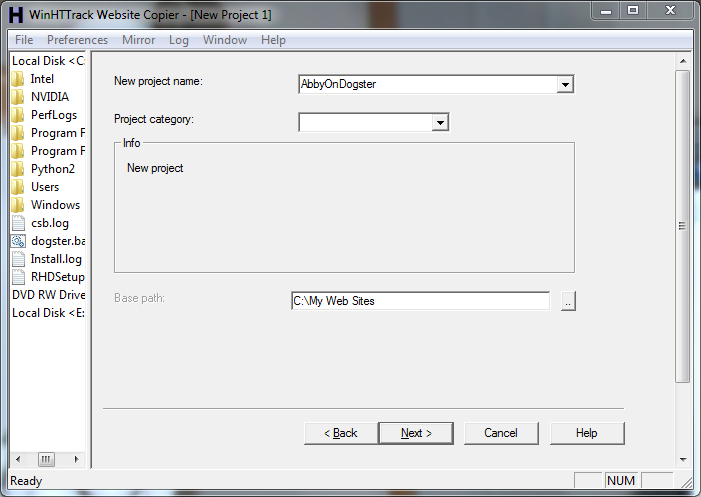
Once you're entered that information, hit the "Next >" button to continue.

Specify the Site To Mirror

So far so good, but now it starts getting a little trickier.  Fill out the next window as follows.
  • Action: Stick with the default of "Download web site(s)"
  • Web Addresses: (URL): The best way to fill this in is to navigate to the Dogster page you want to clone, select the address area, copy it (Control-C), and paste it (Control-V).  Or just type it in from scratch.  The window below shows the address for Abby's page.  It will look something like http://www.dogster.com/dogs/590841.  Click that link to see what I mean.
  • The tricky part is coming up.  Do not hit the "Next >" button yet.  Instead, select the "Set options..." button above it.

Specify the Options

(This Section updated February 5th and then on February 8th to fix the Scan Rules as mentioned at the top of this post).

When you hit the "Set options...." button, there will be a bunch of tabs on top.  Click on the tab that says "Scan Rules".  Don't worry about any of the other tabs.  See the area I have circled in blue?  Click your mouse in that area and delete every single character in there.  You want it to be perfectly empty.  Do not hit the "Exclude link(s)..." button.  Do not hit the "Include link(s)..." button.


Now, copy the four thirteen all of the lines of text below and paste it into the now empty area that has the blue circle above.  Cut and paste is your friend here.
-*
+www.dogster.com/dogs/590841
+www.dogster.com/dogs/590841/*
+www.dogster.com/subscr/gift_archive.php?pet_id=590841
+www.dogster.com/static/*
+www.dogster.com/files*
+www.dogster.com/images/*
+badge.dogster.com/*
+files.dogster.com*
+www.dogster.com/photos/photo.css
+*.cdnsters.com/*
+tetra.saymedia.com/*
+*amazonaws.com/*
+use.typekit.com/*
+*mytextgraphics.com*
+farm*.staticflickr.com/*
+farm*.static.flickr.com/*
--disable-security-limits
--max-rate 1500000
--assume php=text/html
Note that there is now a * after "+files.dogster.com".  This is a change from my first and second cracks at this.  Don't miss that one.

What if you have a cat?  Other than having to vacuum hairballs off the carpet on a regular basis, you want to use this set of scan rules instead.  Abby was not a cat, but work with me here.  Again, cut and paste is your friend.
-*
+www.catster.com/cats/590841
+www.catster.com/cats/590841/*
+www.catster.com/subscr/gift_archive.php?pet_id=590841
+www.catster.com/static/*
+www.catster.com/files*
+www.dogster.com/files*
+www.catster.com/images/*
+badge.catster.com/*
+files.catster.com*
+files.dogster.com*
+www.catster.com/photos/photo.css
+*.cdnsters.com/*
+tetra.saymedia.com/*
+*amazonaws.com/*
+use.typekit.com/*
+*mytextgraphics.com*
+farm*.staticflickr.com/*
+farm*.static.flickr.com/*
--disable-security-limits
--max-rate 1500000
--assume php=text/html
As explained up top, there are lines for both "+files.catster.com*" and "+files.dogster.com*" because Catster's images are actually stored on Dogster's servers.

This might look like Greek to you, but every single character here is important.  Make sure that these four thirteen lines get copied EXACTLY into the area circled in blue above.  That first line is indeed a minus sign followed by an asterisk.  All the other lines start with a plus.  All of this is important.

Or almost all of it.  The "+*mytextgraphics.com/*" won't be necessary for most people and could be safely left out.  One of our friends had a link to this website for an animated image of her pets name so this had to be included to get that to show up.  Others had images from Flickr (+farm*.staticflickr.com/*) and Photobucket (+*.photobucket.com/*).  Again, you can leave these out if your page doesn't link to these sites, but leaving them in there doesn't hurt anything either.  You would have to do something similar for any other off-Dogster sites that you link to for special images like that.  Just be sure to start the name with a plus and follow the format I've used.

You should end up with something that looks exactly like this when you are done.  Unfortunately the Scan Rules list is kind of long now so stuff is getting cut off on the bottom of the list.  But you get my drift.

Now if we were to proceed on from this point, it would copy Abby's page on Dogster because her Dogster ID number is 590841.  What you need to do now is replace the number 590841 with your own dog's ID number in all three places: the second, third, and fourth lines of the list.  Your dog's ID number is the one that shows up in the address bar of your web browser whenever you go to your dog's pet page.  It is usually six or seven digits long.  Do not add or subtract asterisks, slashes, or plus signs, or anything else unless you really know what you are doing.  Just change the number.  Get this wrong and you could end up downloading half of YouTube.  Ask me how I know...

Once you have changed 590841 to your own dog's ID number, hit the "OK" button at the bottom of the window and pat yourself on the back.  The hard part is done.

After hitting the OK button in the window above, you'll be back to the window that offered you the "Set Options" button in the first place.  You've already done that, so you can hit the "Next" button to Continue.


Breeze Past Connection Parameters

The next screen you'll see is shown below.  This is just getting fancy now.  You shouldn't have to worry about anything on this window, so hit the "Finish" button at the bottom.  And cross your fingers, because once you hit "Finish" the download will begin.


Watch the Download

Here is where it gets exciting.  The program is now going to go out and fetch your Dogster page, with all the associated diary entries, photos, and comments.  It is going to store them on your hard drive and change all the links around so that everything works on your local computer.  What it won't do is  create a copy of all the forum discussions or download all of your friends pages.  It gets your stuff for your dog.  And that is the most important thing.


How long this part takes depends on how much stuff you put on Dogster in the first place and the speed of your Internet connection.  Our connection isn't that great but there is a fair bit of stuff on Abby's page, and it still took around five fifteen minutes (the bigger set of Scan Rules from my first crack at this causes a fair bit more stuff to be downloaded).  As it runs, you'll hopefully see some familiar text going by.  The window above has some text that says "...bys_adventures", short for "Abby's Adventures".  This kind of thing told me I was on the right track.

Success!

When your pet's page has been copied, you should see a screen like this. Click "Browse Mirrored Website" and hopefully what you'll be looking at is a copy of your pet's Dogster page.


The actual page will be found where you specified it in that very first screen.  In this example, it would be in a place called "C:\My Web Sites\AbbyOnDogster".  That file will have a directory in it called "index.html".  Just click on that anytime you like and you should see a replica of your dog's pet page.  For our example, the address bar should look something like this.


See how it says "file:///C:/My Web Sites...".  That means that this file is on my local hard drive.  Contrast this with what it says when I access it over the web:

If everything went well, you'll have a copy of your dog's pet page tucked away nice and safe on your hard drive.  Back it up to a USB stick, move the directory around, or do whatever you like.  Have more than one dog on Dogster?  Just repeat the process again as many times as you like.  The ID number is the key.  To be on the safe side,it might be best to use a different project name each time.

Please note that I've put together this method and this writeup in a hurry.  There might be some cases where the process doesn't work.  If you run into trouble, leave me a message in the comments section and I'll try to help you out.  I'll also try to update this page based on people's feedback to clarify any spots where I haven't been clear.

Now I know that not everybody is going to be computer-savvy enough to do this.  But some will be.  All I ask is that those who can figure it out pay it forward and help out those who can't.  Back up their page, zip up the file, and email it to them.  They'll be incredibly grateful, and you'll feel good for helping them out.

Update - January 25th, 2014

First of all, I've been made aware of a couple limitations of this technique:
  • the link to the "Rosette, Star, and Special Gift History" doesn't work
  • clicking on those items from the main page doesn't give the pop-up message from the sender
  • the link to "See all my pup pals" doesn't work
  • the link to the video page doesn't work and the videos aren't downloaded
Now, I am no web guru but it looks like all these things have something in common: the links are not "static" but are dynamically generated when the link is clicked.  That is something that the web mirroring software used in this technique can't handle.  Other web mirroring software is similarly handicapped.

I was asked in one of the comments about videos and, while I can't get that to work as part of this process, I have found a workaround that will let you save each of your videos to your computer as separate files in case you no longer have the original version.

Basically, we are going to set up a "flash downloader".  This is generally an add-on to your web browser that lets you save the videos that you normally don't have an option to save.  The videos on Dogster are in something called "flash video" format, so you'll need a "player" for that too once the file has been downloaded.  I get into that as well.

Other methods besides the one I have tested below are bound to work and you are free to give this a shot with a different browser or technique, but I probably won't be able to help you much if you veer off this beaten path.  And this method should work for everybody on any operating system.

Want to get your videos back?  Here is how.

Step 1: Download Firefox If You Don't Already Have It

Why Firefox?  Because that is what I use, it worked for me, it is awesome, and it is free.  If you already have Firefox, you are awesome and can skip this step.  If you don't, download it from this link and become awesome.  Go ahead.  I'll wait.

Step 2: Open This Post in Firefox

If you are already using Firefox, skip this step as well.  If not, copy the address link for this post from your current browser to Firefox

Step 3: Get the Download Flash and Video Add-On

Like other browsers, Firefox's functionality can be extended with things called Add-Ons.
Install the Download Flash and Video Add-On from this link and clicking the "Add to Firefox" button that shows up in big letters on something like the snapshot below.

Firefox might give you a big scary warning like the one below.  No worries here.  There will be a number that counts down on the greyed out "Install" button on a window...

After a few seconds, the button will change to say "Install now" and it will no longer be greyed out.  Click on "Install Now".  The add-on will install and Firefox will tell you that it will be enabled when you restart Firefox.  Select "Restart Now".  Firefox should restart and bring you back to this page.

Step 4: Show Add-On Bar

Firefox Add-Ons are shown by default on an Add-On bar that is at the bottom of your browser window.  If you don't see a little box with a down arrow in the bottom right hand corner of your browser, hit the "Control" and "/" keys at the same time to make it appear, like so (I've enlarged it to make it easier to see).

Step 5: Get Your Video

So far, so good.  Next thing you want to do is open up your Dogster page and click on the link to open the page showing all of your videos using the "See my Video Book" link on the left side of your pet page.  What you are going to do is...
  • Start the video
  • Pause the video once it starts playing  (it seems to be important that you do this).
When you do this, you'll see the little icon in the bottom right change color.  Click on the icon and you should see something like the window below.  Ignore the "Flash Files to Download" on top.  Click on the video title under "Videos to Download" and the file should download to your computer!

I expect that the name of the downloaded file will look like some random collection of letters and numbers.  You'll certainly want to rename it to something that is understandable.

Step 6: Play the Video

I won't go into too much detail here.  Some computers might already have the software installed to play these videos.  Try opening / double clicking the file to see if it plays for you.  If it does, you are all set and can proceed with downloading all of your other videos.  If not, you'll want to install a piece of software to do so.  I recommend VideoLAN, as it is free, fantastic, and can play just about any kind of video file you throw at it.  It also runs on just about any computer out there.  Get it from this link.


Good luck retrieving the memories of your dog and those of your friends.  Mine are incredibly important to me.

Tuesday, January 1, 2013

2012: The Year That Was

Today is the first day of 2013.  I sit at my kitchen table in front of my laptop with a compile of MESS going in the background.  Like many people today, I sit here finding myself thinking back over the last 365 days.

Certainly, the biggest thing that stands out for me was the passing of our dear dog, Abby.  She was a constant and faithful companion for her eleven and a half years, and was a far better dog than we could have hoped for.  I think about her all the time.
Abby:  January 2001 - August 2012
We now have Buddy in our lives.  Buddy is quite a different dog than Abby was, and certainly a lot more will be written about him in the days and weeks ahead.  He has scared us with some health issues and he has entertained us with his puppy-dog antics.  I look at him each day and wonder what kind of dog he'll turn out to be.  The one thing we learned from Abby is that this is pretty much impossible to predict.
Impossible, Except To Say That He Is Going To Be Trouble
Anyhoo, I sat down and set some goals for myself in 2012 around this time last year.  This was actually a very useful thing to do.  I like to cross things off my TODO list, and I found that putting this list out there was a pretty strong motivator in getting me off my butt.  I need to mull this over a bit still, but I certainly want a new list going in to 2013.  In the meantime, why not take a look back while waiting for the compile to finish to see how I've done in 2012?

Working Out

Goal #1 Hit: "Deadlift 405lbs for a single rep. That's four wheels a side. This goal should be doable. I just have to do it."

It wasn't long after I wrote this that I wrote some more about how much it sucked to have written that in the first place.  In a nutshell, why was I talking about something I could do rather than just going and doing it?  So I went and did it, and made it with pounds to spare.  The year went by and my deadlift continued to improve, culminating with this bad boy.
435 lbs, Baby

Goal #2 Missed (barely): "Squat 280lbs for a single rep below parallel.  285lbs - 290lbs would be even better, as this would be 2x bodyweight."

This was a case of "close, but no cigar".  I hit a 275 lb squat in May, a weight that was indeed 2x my bodyweight at the time.  But 275 lbs is not 280 lbs, so I did not reach this goal.  It wasn't for lack of trying though.  I hit that 275 after several runs of Sheiko, an extremely high volume routine designed to bring your numbers up.

This is a worthy goal to keep shooting for.  Unfortunately, a long stint in Mexico has caused my strength to drop off sharply and my squat seems to have been hit the hardest.  It is coming up again since my return, but a second trip is on the horizon and back down I'll go.  Such is life.

Hacking

Goal #3 Missed: "Get some basic home monitoring going by Christmas 2012."

I put some considerable time into this one but didn't hit it either.  I ran into a couple of snags.  First was the aforementioned  long stint in Mexico.  Second was that my WRT-54G router decided to start acting flaky as I sat down to implement some of this stuff.  The idea was to hack the router so I could plug a Jeenode into it to act as a receiver to other remote Jeenodes around the house.  I added the serial port and SD card mods, but my attempts to get Optware installed on the thing were randomly failing and I couldn't figure out why.  I had suspected bugs in the custom firmware and kept trying various options to see if that would make the problem go away.  Then the router fell over altogether so I bought the mighty Asus RT-NT16 to replace it.  That router now runs Tomato by Shibby with Optware installed just fine.

Again, this is a worthy goal to keep pursuing in 2013.

Goal #4 - Hit: "Get a standalone receiver picking up the transmissions from a Davis outdoor sensor suite by the end of 2012."

I hit this baby back in April and was pretty psyched at having done so.  After that I had to spend a bunch of time figuring out what those transmissions actually carried.  First I sorted out rain and followed that up with outdoor humidity.  The deciphering of all the weather related parameters is now laid bare on github.
This Took Forever To Get Right
I want to keep plugging away at this stuff going into 2013.  I wrote last time about how Davis' recent antics were making me pretty grumpy.  It is my data, and I don't want people trying to take it away from me.

Goal #5 - Hit: "Keep this blog going, share the adventure, and enjoy the ride."

I put up 25 posts in the past year.  Not incredibly prolific, but far from abandoned.  I wrote some stuff that made people laugh, and I wrote some stuff that made people cry.  The goal of this blog was never just to put something out there.  If it wasn't going to be interesting or entertaining, it wouldn't be worth the effort.  Hope you think that it has been.

Have a good 2013 from all of us here at Mad Scientist Labs.  Enjoy the ride

Saturday, August 18, 2012

Two Weeks...

I said goodbye to my best friend two weeks ago tonight.  At this time fourteen days ago, My Lovely Wife, Abby, and I were on our way to the Vet clinic on what would be the last truck ride of her life.  Abby had always loved going for a truck ride.  There were cows and horses to be barked at.  That was her job, but she just wasn't up for it that last time.

It has been a tough couple of weeks since.  However, time heals all wounds, and things here at home are getting pretty much back to normal.

I'm lying.

Things here at home are a shadow of what they once were.  For the feeling My Lovely Wife and I get walking around in our yard, we might as well be walking around Chernobyl.

Our legs and arms feel as if great weights are hanging from them as we force ourselves to go outside.  Any joy that we used to have in wandering around outside is gone.  The ever-present companion we had out there is no longer with us.  The deer come and go in our yard without fear of a four legged missile streaking towards them with bad intentions.

The gloom we feel outside is matched only by the cloud that hangs over us inside.  There is no barking whenever the slightest move is made towards the door.  Our house that once felt too small now feels much too large.  Popcorn night isn't popcorn night without Abby running up to get her treat for the evening as well.  The silence is deafening.

Those who have never had a pet might not understand how we would feel this way.  Those who have lost a pet they loved understand completely.  All of our friends have been very supportive as they knew how much Abby meant to us.  One couple very kindly invited us out to their new cabin at the lake last weekend to give us a much needed change of scenery.  We have also gotten many cards and wonderful words of support from our friends.  Some of these friends we have known for many years.  Others are friends that we've made over the net and have never actually met in person.  To all of those who have expressed your sentiments on our loss, please accept my heartfelt thanks with what is probably my favorite picture of The Pup.
A Very Photogenic Pup at That.
Much to our surprise, My Lovely Wife and I started looking for another dog very soon after Abby passed.  What we came to realize quite quickly was that it wasn't so much the physical attributes of the dog that was most important.  What we realized was that our next dog would absolutely have to have that same enthusiasm and zest for life that Abby had.  You see, we got Abby as a young pup from a pet store.  When we asked to see her outside of the box she was being kept in, she made the best of her opportunity and broke free.  She immediately picked a fight with a mop (and won!), and then tore off to chew the tips off the shoelaces of some innocent bystander.  All of this happened within the space of about 20 seconds.  She carried this enthusiam / bat-shit craziness throughout her life.  Where one dog might sniff around on a trail on the scent of another critter, Abby would crash through an impenetrable mass of underbrush to track that critter down.

This is indeed a tall order.  Many dogs don't have the spark Abby did, but it was this element that we'd miss the most if our next dog didn't have it.  We are reminded by everyone we've talked to that "there will never be another Abby", and we are well aware of that.  Abby was indeed one of a kind.

The search continues.  We have actually come close once or twice, but no cigar.  We'll have to be patient and wait until the dog that is right for us comes along.  Or, as the fellow we bought Abby from told us: "You don't find the dog.  The dog finds you."

Here's hoping...

Sunday, August 5, 2012

Goodbye to My Best Friend

I type this and my heart is broken: My Lovely Wife and I are mourning the loss of our dear dog, Abby.

I wrote a post back in June about how we had a lump removed her abdomen.  We learned a short time later that this lump was a Mast Cell Tumor.  We had a second surgery done to have more of the tumor cells removed but it wasn't enough.  Another lump started growing back and got quite large after only a couple weeks.  The vet took a needle biopsy and determined that this lump was mostly fat but had some mast cells reorganizing to form another tumor.  He suggested that we consult with an oncologist at the University's Vet College to talk over subsequent courses of action.  That was only two days ago.

Yesterday morning we woke to find that Abby had thrown up downstairs.  She seemed otherwise OK.  She spent the day with me outside, wandering around the yard as I puttered.  Her energy level seemed a little lower than usual, but I was hoping that was just due to the heat.  Yesterday evening, she started pacing around restlessly throughout the house.  Then she threw up again.  We let her outside and she continued getting sick while keeping her distance from us.  Then she just laid down in the grass while clouds of mosquitoes buzzed over her.  Abby looked up at My Lovely Wife while she laid there with a look that said "Help me".  She was dying.

We got her into the truck at 10pm and drove her to the Vet College.  The half hour drive was quiet as My Lovely Wife and I were filled with the dread of what could happen next.  Abby lay there quietly, her head bobbing up and down.

We parked the truck at the front door of the Vet.  What happened next amazed us.  Abby jumped out of the truck and started sniffing around all over the place!  Her ears were up and she had a spring in her step!  It seemed like the sick dog we had just a short time ago was only a bad dream.

We debated what to do next.  Was this just a false alarm???  Maybe it was just something she ate and she was going to be fine?  We decided to have her looked at since we were there.

Sadly, the vet confirmed our fears.  Abby started fading again and the vet discussed our options.  None of them were good.  They brought Abby into a private room where we were able to hold her close and tell her how much we loved her.  We were with her as the vet helped her pass shortly after midnight this morning.

My only solace is that we did what we had to do and that was to put an end to her suffering.  Abby gave us eleven and a half wonderful years, a ripe old age for a dog her size.  And every day in every one of those years, Abby filled our hearts with joy.  Every.  Single.  Day.  When her day finally came, Abby used the last of her energy to trot into that clinic with her head high and ears up.  She epitomized pure grit.  I was so proud of her.
Grit
Throughout her life, I was always struck by Abby's strength, enthusiasm, and character.  She was a gentle giant around small children one minute, and a fierce protector of her owners and her property the next.  I've written about her adventures before, as has My Lovely Wife.  There always seemed to be so much to say.

We woke up this morning to a house that is too empty.  Too quiet.  We are reminded of her everywhere we look.  This morning, there is no one to take for a walk.  There is no one to chase the deer out of the yard.  There is no one to bring our slippers when we come in to the house.

Abby was my first dog.  She taught me the connection a man makes with his dog.  It wasn't something that happened right away for me.  Abby had a bad habit in the first months that we owned her of always jumping up on us.  One time she jumped up at me and I stuck my knee up.  She hit it hard and fell back in pain.  I felt terrible.  I knew then that I loved her, and I grew to love her more each day after that.

Abby was my psychologist.  We would go for long walks and I'd talk to her about things I wouldn't talk to anyone else about.  And I'm sure My Lovely Wife did the same.  Abby didn't understand, but it always seemed like she did.  That was all that mattered.

Abby was my companion.  We would get asked where Abby would stay, meaning if she was an "inside dog" or an "outside dog".  We simply answered that Abby was where we were.  She was at our side inside and out, day in and day out.

Abby was my bodyguard.  We would go for walks around the acreage and Abby would at times cut right in front of us and just stand there with her body physically blocking the path.  If we would try to walk around her, she would do it again until we turned around.  Now and then we'd catch a glimpse of coyotes or some other nasty critter on the path ahead.  We soon learned to put our trust in her and her nose for our own safety.
The Big Dog, On Patrol
Most of all, Abby was my best friend.  I would arrive home after work and My Lovely Wife would "release the hound", who would come running up to me with all the enthusiasm that only a dog separated all day from its owner can bring.  That would always and instantly melt away the earlier shit of the day and make me feel human again.  I am forever indebted to her for this alone.

Goodbye Abby.  You were the best dog we could have dared to hope for.  We were truly lucky to have had you in our lives.  I have shed many tears over you as I have written this and I will shed many more today and in the days to come.  We love you.  We miss you.  Rest easy, Pup.
Abby    January 2001 - August 2012

Wednesday, July 18, 2012

A Vote for Abby is a Vote for Awesomeness

I know that I have not posted in ages.  As in past years, summer tends to consume me and I am outside busting ass on the Ponderosa instead of sitting in front of my laptop writing.  However, it is time to take a break from ass-busting to let you know of a little something The Pup is involved with.  My Lovely Wife has entered Abby into a contest to appear in a calendar, and Abby is one of six finalists to appear on the cover!
Awesomeness
Here are a few words My Lovely Wife wrote to go with our entry.
This is our dog, Abby. She is a 11.5 year old Chesapeake Bay Retriever/German Shepherd cross. Her favorite thing is to retrieve sticks thrown into the river and you can see how happy this makes her! Abby is currently recovering from her second surgery in two weeks to remove a Mast Cell Carcinoma. We are hoping all the nasty cells have been removed and once her staples are removed next week, she can once again enjoy her summer with swims in the river. We love her dearly and cherish everyday with her. Thank you for voting for our sweet girl.
I took this picture a couple of years ago and think it does a great job of capturing Abby's spirit and energy.  If you think so too, head on over to Facebook and like her picture.  Your vote could help put Abby over the top!

The calendar is a fundraiser for The Konan Koalition.  As it says on their website
The Konan Koalition has two goals:
  • Mitigate unnecessary pain and suffering in animals that cannot access veterinary treatment because of financial constraints facing their owners
  • Assist pet owners in making animal care decisions based upon the needs of the animal rather than financial limitations. Helping pet owners in this way will go a long way to reduce unnecessary euthanasia
A fine cause indeed.

Voting closes July 31st.  So don't delay,  vote for Abby today!

Thursday, January 12, 2012

Happy Birthday to My Best Friend

This blog tends to cover a lot of ground: from landscaping to food to hacking.  Some stuff is pure technical geekery, while other stuff is more personal.  This blog entry will be some of the latter.

It has been said many times that man's best friend is his dog.  Here is mine.  Her name is Abby and she is indeed my best friend.
Say Hello to Abby
I write this on a special day as it is Abby's 11th birthday.  Her mother was a purebred Chesapeake Bay Retriever and her father was a German Shepherd that happened to be nosing about at the right time.  Abby was an accident, but a happy accident.  Happy Accident #1.

My Lovely Wife and I were new in town, and we were about to move into our new home on an acreage in a week.  She was phoning around for alarm systems when someone told her that she'd just be better off with a big dog given our remote location.  Our friend gave us directions to a pet store, but since we didn't know the city, we went to the wrong place.  Happy Accident #2.

It was very much love at first site, despite knowing nothing about her breed.  We looked it up in one of the books at the pet store and it described Chesapeakes as "large, solid dogs".  Indeed, she weighed 18lbs at eight weeks of age.  We didn't know it then, but the size of her knees were a giveaway that she would someday fit the advice given to us by the alarm system salesperson.

We took her home a week later.  Our new home was about a half hour drive away from the store.  We were within a quarter mile of the new place before she turned her head towards me and threw up all over my jacket.  Happy Accident #3.

Over the years, Abby would grow out of her car sickness and grow in to her knees, tipping the scales around 82 lbs at one point.  We brought her with us when we picked up and drove 2000 miles to our current home around eight years ago.  One of the prerequisites in picking our new home was some place that would be dog friendly.  Chesapeake's were bred to retrieve game fowl from the icy waters of the Chesapeake Bay on the U.S. East Coast, and when a nice place right on the river came along... well...
Less Icy In the Summer
Our home on the river means we have lots of wildlife wandering by, and then fleeing for their life once Abby catches wind of them.  The trails we maintain through the forest alongside the river's edge makes walking the dog a joy, not a chore.  My Lovely Wife's "job" is to keep the home fire's burning while I am at work, and they enjoy several beautiful walks each day.  The two are inseparable.
Abby On Bush Trail Patrol
Fortunately for us, we don't have to worry too much when Abby tears after some critter like a bat out of hell.  She is big enough and strong enough that she can handle herself for the most part.  For the most part.  Abby likes to act first and think about questions later.  A good question to ask up front might have been "Should I really go after that porcupine?  Again?"
Not Such A Good Idea, As It Turned Out
Another Chesapeake behavior that Abby features is a certain stubbornness. Strangely, this feature is not mentioned in books that encourage people to get a Chesapeake.  She listens to us when she wants to.  At times this is maddening; at other times, hilarious.  But it gives her an unpredictable nature to her character that makes Abby the dog she is, and I'm not sure I'd want her to be any different.  I like to think of it as selective understanding.

While she has many Chesapeake qualities, her German Shepherd side comes through in several ways as well.  The coloring around her muzzle is one obvious spot, but another one a little less obvious is the Shepherd instinct to always walk a little bit ahead and lead the way.  This has an interesting side effect: she is in every picture we have ever taken.
Abby Hamming It Up... Always
Abby's many interesting qualities and the environment she lives in have combined to give an endless stream of wonderful stories over the past eleven years.  Since it takes a long time to type in an endless stream of wonderful stories, I'll pick three favorites.

Story #1: A year after we got Abby, we had a visit from some friends whose daughter was maybe a year old at the time.  She was just getting good at walking but was not yet at the point where she could build a lot of speed.  Somehow, this little girl quickly built a connection with a dog that was much taller than she was and many times her weight.  The little girl would toddle out from the kitchen table to the living room with Abby walking slowly behind.  They would switch around at the coffee table in the living room so that Abby walked in front on the way back to the kitchen with the little girl following behind.  They did this once or twice before anybody really realized what was going on.  It was one of the most amazing things I've ever seen.

Story #2: My Lovely Wife plugged a kettle in before heading upstairs to take a shower.  Abby started barking soon after.   My Lovely Wife yelled at her to stop but Abby keeps at it.  Finally, My Lovely Wife heads back downstairs to see what all the barking is about before starting her shower.  It turns out that the cord on the kettle was shorting out and the kettle's base was starting to smoke and melt down.  My Lovely Wife was able to unplug it before any serious damage was done.  Abby just might have saved our house from catching fire and burning down.

Story #3: Not that long ago, a group of people came in to our yard to sell us some religion.  They rang the front doorbell and Abby went crazy.  My Lovely Wife mistakenly answered the side door.  She was busy and didn't have much patience for what she knew this crew was here to do.  She was holding Abby by the collar at the side doorstep as Abby was working hard to pull away.
Them [nervously]: "My!  HE's a big one!  I hope HE isn't hungry!"  [Abby gets called a HE all the time because of her size].
Abby decided to answer the only way she could, and she did so with the timing of Bob Hope.
Abby: BEEEELLLLCCCCCCCCHHHHHHHH.
Them: "Oh, I can see you are busy.  We best get going now."
And they drove the hell out of our yard at high speed.

I think you get the idea.  My Lovely Wife and I believe that Abby is a very special dog and we love her will all our hearts.  She has certainly slowed down over the years, and I know she won't last forever.  But neither will I.  That is why Abby's will bequeaths everything she owns to me, and why my will bequeaths everything I own to her.  Until that fateful day comes to pass, I cherish every day with her.  Every single day.  And that is no accident.

Happy Birthday Abby, and many more.

--------------

P.S.  If you'd like to know more about Abby, My Lovely Wife keeps a diary of her various adventures here on Dogster.  There you'll find many more stories and pictures that will be sure to get a laugh.  Skip anything related to garter snakes if you are squeamish.